HeyTalent includes a job board of your own: a public page with your
open positions that you can customise and link from your website. It
costs nothing extra and takes a few minutes to set up.
It lives under Jobs, in the ATS section of the menu.
Publishing a role
The Jobs tab shows your positions ( Open and Closed ) as cards
with company, location, salary band and owner. New ones are created with
“+ New job”.
Each card carries a Private / Public toggle: while it's Private the
role only exists inside HeyTalent; flip it to Public and it appears on
your career page.
Customising the page
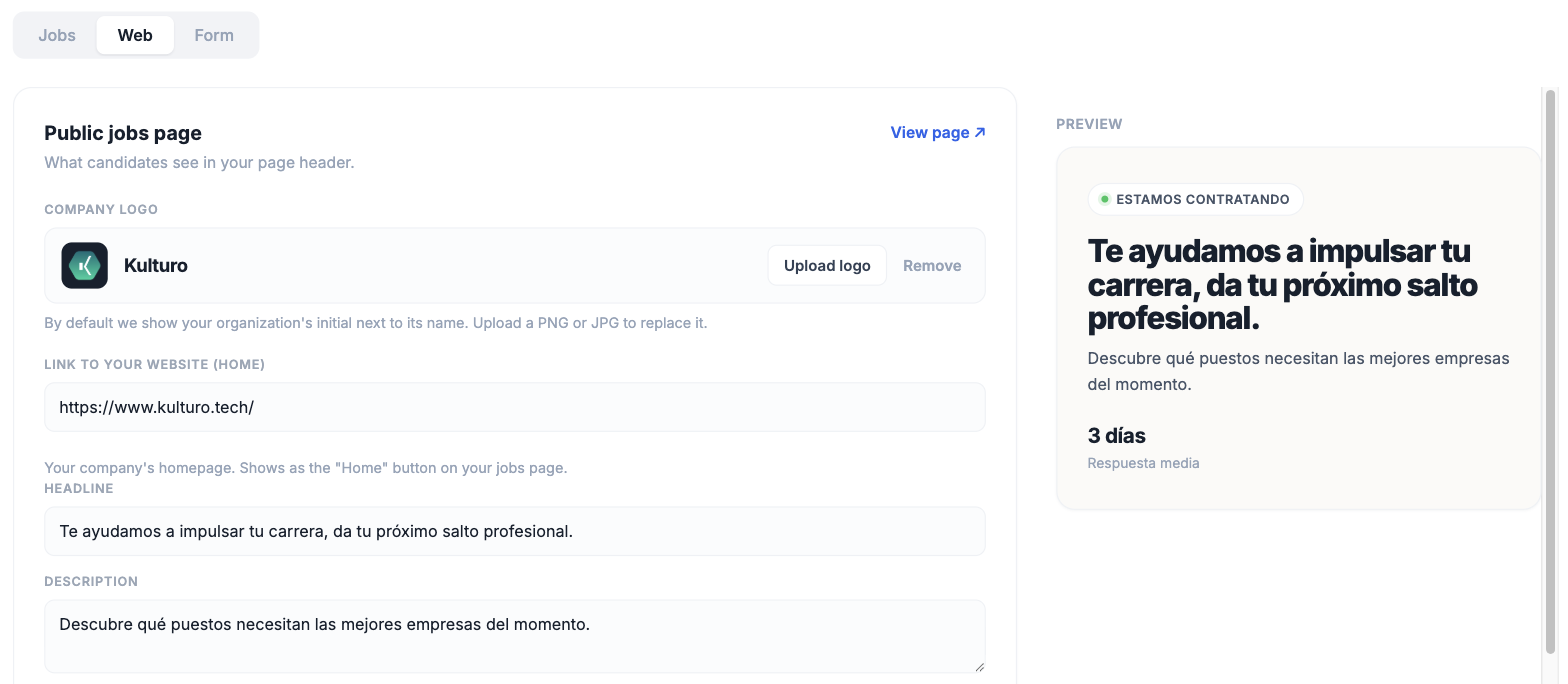
The Web tab controls what candidates see in the header of your public
page:
- Company logo: upload a PNG or JPG. Without one, your
organisation's initial is shown instead.
- Link to your website (Home): your company homepage. It shows up as
the Home button on your jobs page.
- Headline and Description: the opening line and paragraph.
- Response time: the average response time you commit to (three
days, for instance). Candidates see it.
On the right there's a live preview that updates as you type, and
“View page” at the top opens the real thing.
The Form tab is what a candidate fills in when they apply. Candidates
who come in that way land in your ATS, ready to move through the
role's pipeline.